

Customize survey answer lists with JavaScript and CSS
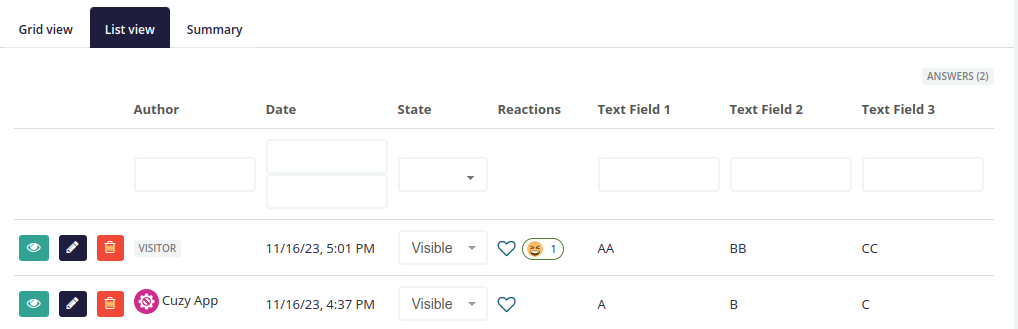
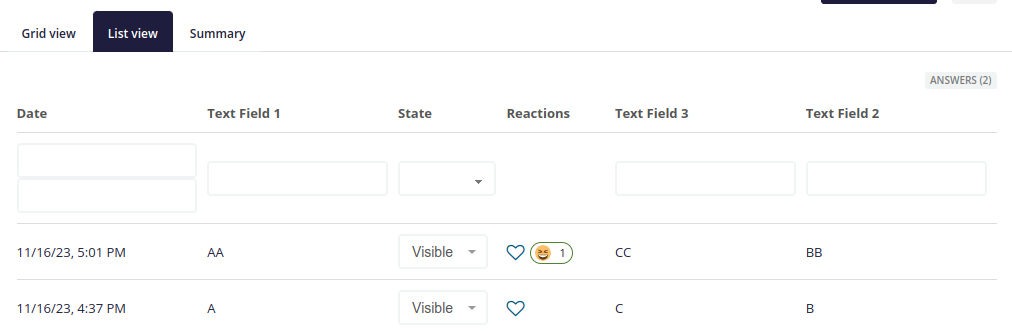
Each survey accepts its own JavaScript and CSS code. This example hides some columns of the answers list and changes the order of others.
Hide and reorder the columns of the answers list
The code:
$(function () {
  // Column number to move: column number to move it before
  const colToMoveFromBeforeCol = {
    9: 8,
    7: 5,
  };
  // Column numbers to hide
  const colToRemove = [0, 1, 2];
  $("#survey-answers-list tr").each(function () {
    const $thisRow = $(this);
    Object.entries(colToMoveFromBeforeCol).forEach(([fromNb, toNb]) => {
      const $fromCell = $thisRow.find("td, th").eq(fromNb);
      const $toCell = $thisRow.find("td, th").eq(toNb);
      if ($fromCell.length && $toCell.length) {
        $fromCell.detach().insertBefore($toCell);
      }
    });
    colToRemove.forEach(colNb => {
      $thisRow.find("td, th").eq(colNb).hide();
    });
  });
});
Add it in the advanced settings of the survey:

Before:
After:
Read next
- Show survey answers anywhere with shortcodes
- Pre-fill survey fields from the profile or the URL
- Survey templates: reuse, export and import surveys
- Sub-surveys: create a survey for each answer
- Advanced Survey module: features and price
- New versions of the modules by email: the CUZY newsletter, a few times a year