

Customize the emails sent to inactive members
Each of the six actions has its own email, with a default text in every language of HumHub. You can rewrite the subject, the body and the button, and insert the member's name and the dates with tags.
1. Open the template of an action
In the settings of the module, each panel ends with an "Edit … email template" button. It opens the email of that action in a dialog:
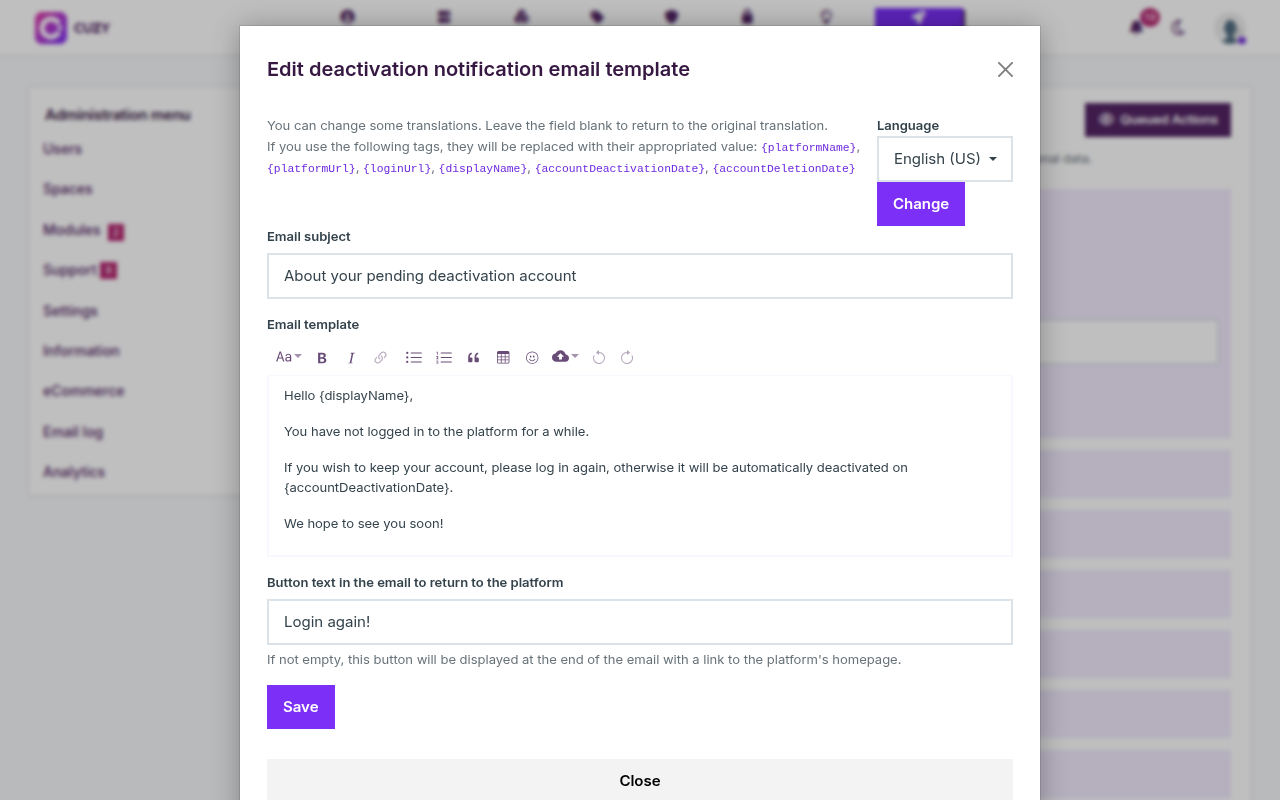
The dialog has three fields: the email subject, the email template (the body, in HumHub's rich text editor) and the button text. If the button text is not empty, the email ends with a button to the login page of your HumHub. Save in the dialog; the settings page itself does not need to be saved again.
2. Insert the member's name and the dates with tags
These tags are replaced when the email is sent:
{displayName}: the name of the member.{accountDeactivationDate}and{accountDeletionDate}: the date of the upcoming action, written in full in the member's language.{platformName},{platformUrl},{loginUrl}: the name of your HumHub, its address and its login page.
The default texts already use them: "If you wish to keep your account, please log in again, otherwise it will be automatically deactivated on {accountDeactivationDate}."
3. One text per language
Every email exists in each language enabled on your HumHub, with a default translation. Pick the language at the top right of the dialog and click Change to edit that version; a member receives the email in the language of their account. Leave a field blank to return to the default text of that language.
4. The six emails
Their default subjects, in English:
- Notification before deactivation: "About your pending deactivation account".
- Reminder before deactivation: "About your pending deactivation account (reminder)".
- Deactivation: "Your account has been disabled". When the deletion is enabled, the body adds the date of the deletion.
- Notification before deletion: "About your pending deletion account".
- Reminder before deletion: "About your pending deletion account (reminder)".
- Deletion: "Your account has been deleted", without a button.
When an email cannot be delivered, the error is written in the HumHub log and the member stays in the queue of that action. The emails use HumHub's own mail layout, so the logo and the footer of your HumHub are kept.
Read next
- Set up User Cleanup for inactive HumHub accounts
- Deactivate inactive HumHub accounts automatically
- Delete inactive HumHub accounts after deactivation
- Check and run the queued cleanup actions
- User Cleanup module: features and price
- New versions of the modules by email: the CUZY newsletter, a few times a year