

Check and run the queued cleanup actions
The Cleanup tab of the user administration lists, for each action, the members it concerns at the next run and those it was carried out for. It is where you check a configuration before trusting it, and where you run the actions by hand.
1. Open the Cleanup tab
Go to Administration → Users → Cleanup (the "Queued Actions" button of the settings page leads there too). The table has one row per action:
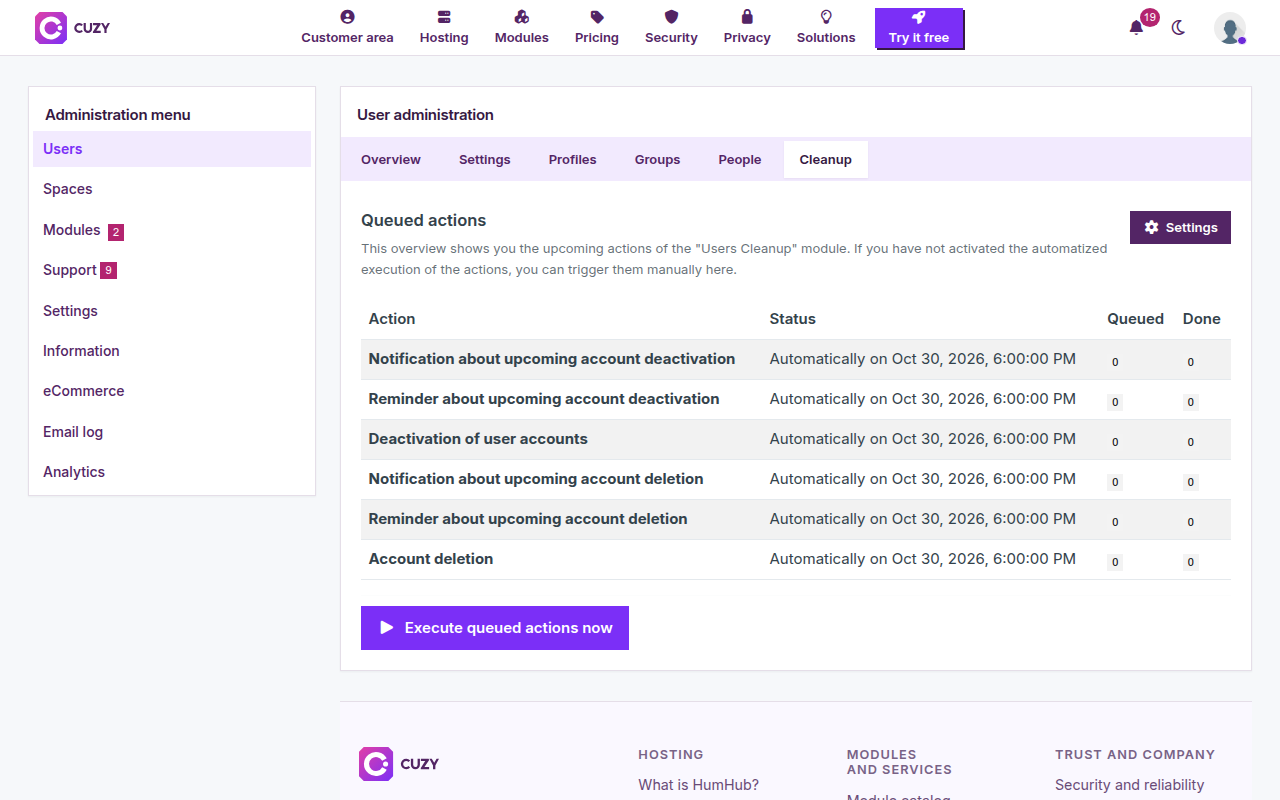
- Status: "Disabled", the date and time of the next daily run, or, for a deletion that is not automatic, the "Delete these users accounts" button.
- Queued: the number of members the action will be carried out for at the next run. Click it to see them: name, email, last login, and a button to edit the account.
- Done: the number of members the action was carried out for. Click it for the list, with the date of the action and who started it (the daily job or an administrator). A member who logged in again disappears from this list, since their sequence starts over.
2. Check a configuration before trusting it
- Save the settings with the emails and the deactivation enabled, but the deletion off.
- Open the Cleanup tab and read the Queued count of the first notification: it is the number of members who will receive it at the next run. Open the list and check that the last login dates are what you expect.
- Do the same for the deactivation: its queue stays empty until the notification and the reminder have been sent and their timespans have elapsed.
- Enable the deletion last, without "Delete accounts automatically", and look at its queue before clicking the button.
3. Run the actions by hand
"Execute queued actions now" queues every enabled action immediately instead of waiting for the daily run; the deletion is included only when it is automatic. The actions run through HumHub's queue, so the Done counts rise a few moments later. In the Done lists, these runs are attributed to the administrator who clicked, the daily ones to "Daily cron job".
Each action runs once at a time: a second click while the first run is still waiting queues nothing new.
Read next
- Set up User Cleanup for inactive HumHub accounts
- Deactivate inactive HumHub accounts automatically
- Delete inactive HumHub accounts after deactivation
- Customize the emails sent to inactive members
- User Cleanup module: features and price
- New versions of the modules by email: the CUZY newsletter, a few times a year